
Voice and text
Offline voice translator for travel
Ask for directions, check in at a hotel, or have a two-way conversation in airplane mode after preparing both languages.
Yakpack can recognize speech, translate it, and read the reply aloud on your phone. Test your language pair in airplane mode with Wi-Fi off after installing the necessary speech model, language resources, and voices.
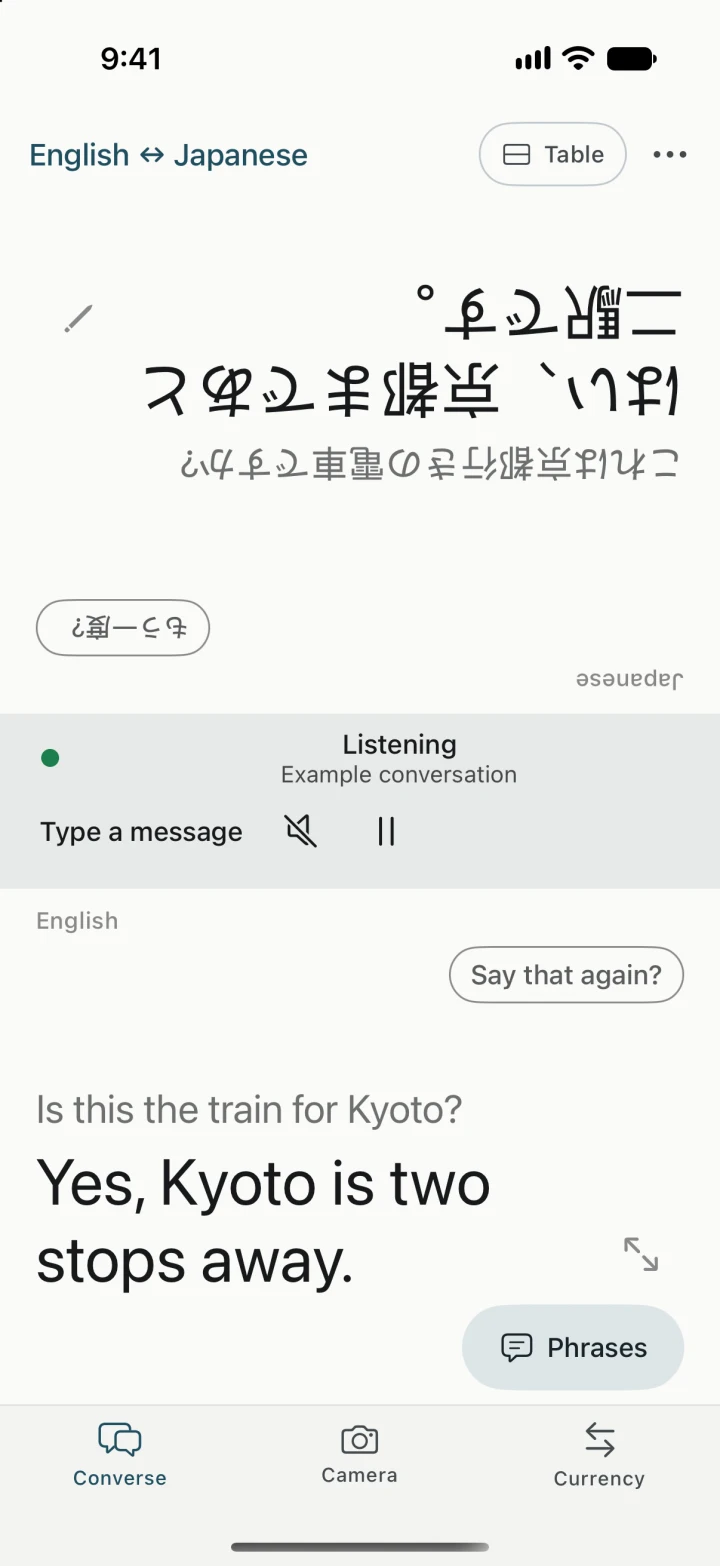
Prepare both directions before you leave
- In Get ready for a trip, select your language and the other person’s language.
- On Wi-Fi, check that speech, translation, and the voices you want to hear are ready. Yakpack’s downloadable Whisper model recognizes speech on the phone.
- Turn on airplane mode and check that Wi-Fi is off. Say a short question and have someone answer in the other language, or test each side yourself. Listen for playback in both directions.
Some Android system speech and playback options can use a network connection. Choose the offline speech option and an installed offline voice when preparing for no signal. Follow the full offline setup checklist.
Try it at a hotel desk
Ask “Can we leave our bags here until check-in?” and pause for the reply. Set the phone between you in Table view so the clerk can read their side. Use Handheld if you’re reading both languages yourself. Say the pickup time back in a separate sentence to confirm it.
If you get the text but hear nothing
Tap the translated line to replay it and check media volume and audio output. If a voice isn’t installed, show the translated text while you’re offline. If the mic is picking up the lobby, type the question. You can also correct a misheard word or revisit the saved exchange on your phone.