
Prices abroad
Offline currency converter for travel
Estimate local prices in your home currency at markets, cafés, and ticket counters using exchange rates saved on your phone.
Currency works offline with a rate table bundled in the app. A successful refresh saves a newer table to the phone. The rate date on screen tells you which figures the estimate uses.
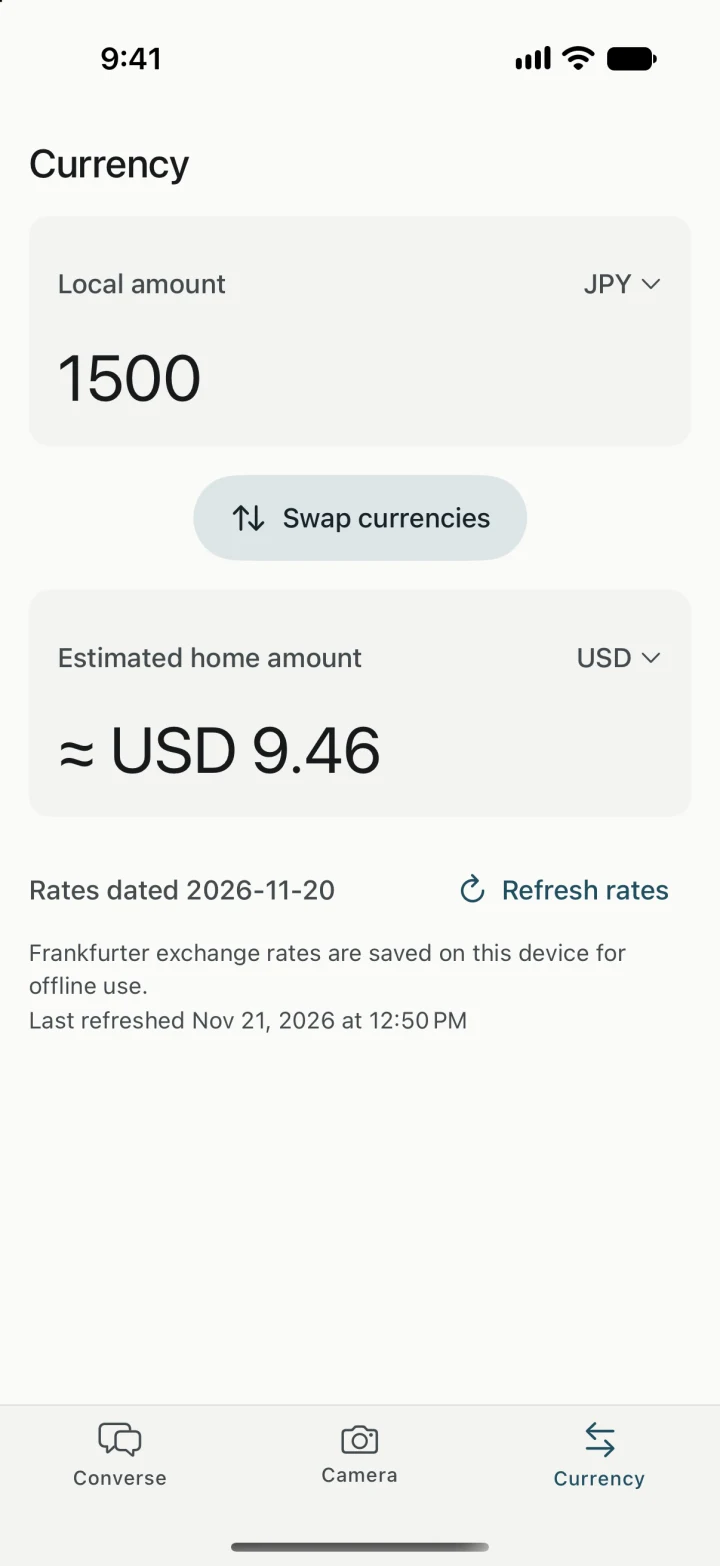
Price a purchase at the counter
- In Currency, choose the currency shown on the price tag as Local and the currency you budget in as Home.
- Enter the local amount, such as 1,500 Japanese yen for a ticket. The home amount updates as you type.
- Use Swap currencies if you want to work backward from a budget in your home currency.
Know which rate you’re looking at
The rate date tells you how current the saved exchange data is. “Last refreshed,” when shown, tells you when your phone last successfully saved the rates. Before a day away from Wi-Fi, use Refresh rates while you’re connected. Your card, cash exchange provider, or merchant may use a different rate and add fees, so use the result as an estimate.
Read the original price before converting
For a menu in another language, freeze it in Camera and turn on price estimates. If Yakpack can’t read a price or currency symbol clearly, compare it with the original and enter the amount in Currency. See how the menu translator handles prices.